МиМ. NodeMCU ESP8266
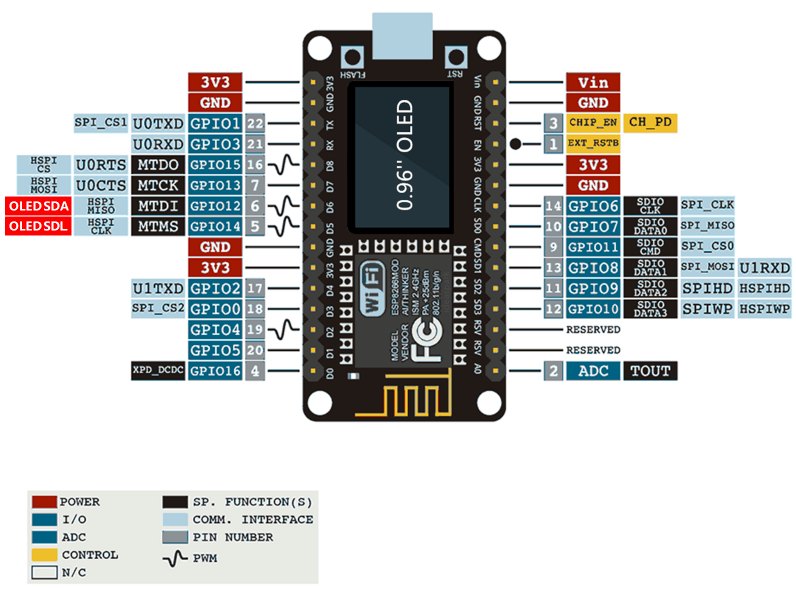
https://forum.arduino.cc/t/cant-drive-nodemcu-esp8266-12f-built-in-oled-display/1228766/2
Установка библиотек:
u8g2
Русскоязычные шрифты: https://github.com/Vladimir-Trufanov/IttvePW/blob/master/U8g2/U8g2.md
Пример программы:
#include <U8g2lib.h>

U8G2_SSD1306_128X64_NONAME_F_SW_I2C
u8g2(U8G2_R0, /* clock=*/ 12, /* data=*/ 14, /* reset=*/ U8X8_PIN_NONE);   // All Boards without Reset of the Display

void setup() {
  u8g2.begin();
  u8g2.clearBuffer();
  u8g2.setFont(u8g2_font_osb26_tf);
  u8g2.drawStr(0,48,"Hello!!!");
  u8g2.drawFrame(0, 20, 128, 32);
  u8g2.sendBuffer();
}

void loop() {
  // put your main code here, to run repeatedly:
}
Вложенный вызов функции
#include <U8g2lib.h>

U8G2_SSD1306_128X64_NONAME_F_SW_I2C
u8g2(U8G2_R0, /* clock=*/ 12, /* data=*/ 14, /* reset=*/ U8X8_PIN_NONE);   // All Boards without Reset of the Display

void drawText(String text) {
  u8g2.clearBuffer();
  u8g2.setFont(u8g2_font_osb26_tf);
  u8g2.drawStr(0,48,text.c_str());
  u8g2.drawFrame(0, 20, 128, 32);
  u8g2.sendBuffer();
}

void setup() {
  u8g2.begin();
  drawText("123");
  delay(1000);
  drawText("456");
}

void loop() {
  // put your main code here, to run repeatedly:
}
Связь с платой по WiFi
#include <U8g2lib.h>
#include "arduino_secrets.h"
#include <ESP8266WiFi.h>
#include <ESPAsyncTCP.h>
#include <ESPAsyncWebServer.h>

U8G2_SSD1306_128X64_NONAME_F_SW_I2C
u8g2(U8G2_R0, /* clock=*/ 12, /* data=*/ 14, /* reset=*/ U8X8_PIN_NONE);   // All Boards without Reset of the Display

void drawText(String text) {
  u8g2.clearBuffer();
  u8g2.setFont(u8g2_font_osb26_tf);
  u8g2.drawStr(0,48,text.c_str());
  u8g2.drawFrame(0, 20, 128, 32);
  u8g2.sendBuffer();
}

char ssid[] = SECRET_SSID;        // your network SSID (name)
char password[] = SECRET_PASS;    // your network password (use for WPA, or use as key for WEP)


String slider1Value = "0";
const char* PARAM_INPUT = "value";

// Create AsyncWebServer object on port 80
AsyncWebServer server(80);

const char index_html[] PROGMEM = R"rawliteral(
<!DOCTYPE HTML><html>
<head>
  <meta name="viewport" content="width=device-width, initial-scale=1">
  <title>Slider</title>
  <style>
    html {font-family: Arial; display: inline-block; text-align: center;}
    h2 {font-size: 2.3rem;}
    p {font-size: 1.9rem;}
    body {max-width: 400px; margin:0px auto; padding-bottom: 25px;}
    .slider { -webkit-appearance: none; margin: 14px; width: 360px; height: 25px; background: #FFD65C;
      outline: none; -webkit-transition: .2s; transition: opacity .2s;}
    .slider::-webkit-slider-thumb {-webkit-appearance: none; appearance: none; width: 35px; height: 35px; background: #003249; cursor: pointer;}
    .slider::-moz-range-thumb { width: 35px; height: 35px; background: #003249; cursor: pointer; }
  </style>
</head>
<body>
  <h2>ESP Web Server</h2>
  <p><span id="textSlider1Value">%SLIDER1VALUE%</span></p>
  <p><input type="range" onchange="updateSliderPWM1(this)" id="pwmSlider1" min="0" max="1023" value="%SLIDER1VALUE%" step="1" class="slider"></p>
<script>

function updateSliderPWM1(element) {
  var sliderValue = document.getElementById("pwmSlider1").value;
  document.getElementById("textSlider1Value").innerHTML = sliderValue;
  console.log(sliderValue);
  var xhr = new XMLHttpRequest();
  xhr.open("GET", "/slider1?value="+sliderValue, true);
  xhr.send();
}

</script>

</body>
</html>
)rawliteral";

// Replaces placeholder with button section in your web page
String processor(const String& var){
  if (var == "SLIDER1VALUE"){
    return slider1Value;
  }
  return String();
}


void setup(){
  // Serial port for debugging purposes
  Serial.begin(115200);
  u8g2.begin();

  // Connect to Wi-Fi
  WiFi.begin(ssid, password);
  while (WiFi.status() != WL_CONNECTED) {
    delay(1000);
    Serial.println("Connecting to WiFi..");
  }

  // Print ESP Local IP Address
  Serial.println(WiFi.localIP());
  drawText("WiFi");
  // Route for root / web page
  server.on("/", HTTP_GET, [](AsyncWebServerRequest *request){
    request->send_P(200, "text/html", index_html, processor);
  });

  // Send a GET request to <ESP_IP>/slider?value=<inputMessage>
  server.on("/slider1", HTTP_GET, [] (AsyncWebServerRequest *request) {
    String inputMessage;
    // GET input1 value on <ESP_IP>/slider?value=<inputMessage>
    if (request->hasParam(PARAM_INPUT)) {
      inputMessage = request->getParam(PARAM_INPUT)->value();
      slider1Value = inputMessage;
      drawText(slider1Value);
    }
    else {
      inputMessage = "No message sent";
    }
    Serial.println(inputMessage);
    request->send_P(200, "text/plain", "OK");
  });

  // Start server
  server.begin();
}

void loop() {

}